What is PageSpeed Insights?

What Is PageSpeed Insights? (And Why It Matters for SEO)
Google PageSpeed Insights is a free performance auditing tool that evaluates how fast and user-friendly your website is on both mobile and desktop. For businesses relying on online visibility, it’s not just a technical checker; it’s a critical component of modern SEO and conversion optimization.
If you’re serious about improving rankings, reducing bounce rates, and increasing leads, understanding how this tool works is essential. Especially when paired with a professionally optimized site like our landing page services.
Key Performance Metrics
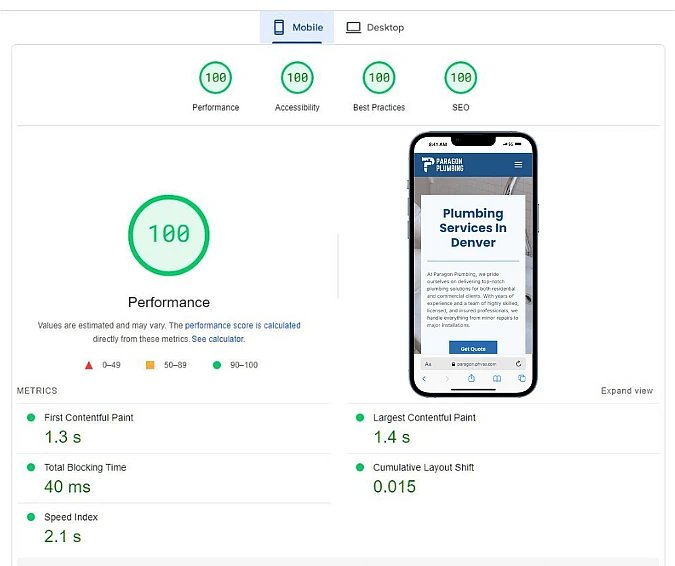
PageSpeed Insights measures several performance indicators that directly impact both user experience and search rankings:
- First Contentful Paint (FCP): How quickly users see the first visible content
- Time to Interactive (TTI): When the page becomes fully usable
- Speed Index: How fast content is visually displayed
- Largest Contentful Paint (LCP): Loading performance of main content
These metrics are part of Google’s ranking signals, meaning a slow site can hurt your visibility no matter how good your content is.
Performance Scores
Each page is assigned a score from 0 to 100:
- 90–100: Fast (optimized)
- 50–89: Needs improvement
- 0–49: Poor performance
But the real value lies in the recommendations. PageSpeed Insights identifies specific issues such as:
- Unoptimized images
- Excessive JavaScript or CSS
- Render-blocking resources
- Poor caching setup
These insights are exactly what we address in our website optimization services. So you don’t have to deal with the technical complexity yourself.
Core Web Vitals
PageSpeed Insights highlights Core Web Vitals, which are now official Google ranking factors:
- LCP (Loading Performance)
- FID (Interactivity)
- CLS (Visual Stability)
Improving these metrics ensures your site not only ranks better but also delivers a smoother, frustration-free experience. This is a core focus in every high-converting landing page we build.
Mobile and Desktop Analysis
With mobile traffic dominating, PageSpeed Insights evaluates your site separately for:
- Mobile performance (SEO priority)
- Desktop performance
Many websites look fine on desktop but perform poorly on mobile. Something we specifically address in our mobile-optimized websites.
Lab and Field Data
PageSpeed Insights uses two types of data:
- Lab Data: Controlled testing environment (ideal for debugging)
- Field Data: Real-world user data (actual visitor experience)
This combination gives a more accurate picture of your website’s performance beyond just theoretical scores.
Powered by Lighthouse
Under the hood, PageSpeed Insights runs on Lighthouse, which audits:
- Performance
- Accessibility
- SEO
- Best practices
This means you’re not just optimizing for speed, you’re improving your overall website quality.
Why PageSpeed Insights Should Be Part of Your Strategy
Using PageSpeed Insights isn’t just about chasing a high score. It’s about identifying bottlenecks that affect:
- User experience
- Conversion rates
- Search engine rankings
If your site is slow, cluttered, or poorly optimized, you’re likely losing potential customers. That’s why investing in a streamlined conversion-focused website can make a measurable difference in your business results.
Final Thoughts
PageSpeed Insights gives you a clear, data-driven roadmap to improve your website’s performance. Whether you’re running a small local business or scaling your online presence, optimizing your site speed is no longer optional, it’s a competitive advantage.
If you’d rather skip the technical side and get a site that’s already optimized for speed, SEO, and conversions, explore our done-for-you website solutions.